No P2W Minecraft SMP

TMCC

Welcome to the tutorials and help page!

TMCC Tutorials | LandClaims

Protect Your Property

Quick reference for LandClaiming

shovel Land Claim Video Tutorial

Quick Commands

  • /Rules to get started!
  • /Trust and /Untrust Give full perms or removes full perms from a player in your claim.
  • /AccessTrust Gives a player permission to use your buttons, levers, and beds.
  • /ContainerTrust Gives a player permission to use crafting gear, containers, and animals.
  • /TrustList Lists the permissions for the claim you’re standing in.
  • /SubdivideClaims Subdivide your claims.
  • /ClaimsList Lists your claims and claim block details.
  • /AbandonClaim Deletes the claim you’re standing in.
  • /AbandonAllClaims Deletes all of your claims.
  • /BanFromClaim Bannish a player from your claim.

  • How things work

    Helpful Commands

    Command Quick Reference

  • /Rules will list the rules.
  • /Tpr will random teleport you to main world.
  • /Back to go back to previous area, does not work on death.
  • /Sethome to set a home. /home to teleport to a home.
  • /Tpa to request tp a player. /Tpahere to request a player to you.
  • /Warps to see available warps.
  • /Nickname to nickname yourself.
  • /Msg to private message a player.
  • /Ignore will ignore a player that is harrassing or annoying you.
  • /Ec to open your enderchest.
  • /Sb toggles the scoreboard off/on. /Ab Toggle toggles the broadcasts off/on.
  • /Ar Check or /Ar Help to see rank information.
  • /Who shows whos online. /Realname shows a nicked players realname.
  • /Vote to vote. /VoteShop to redeem your /VotePoints.

  • Economy

    Item ChestShop

    shop

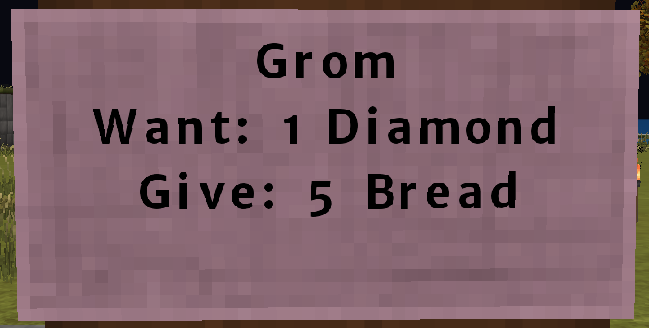
    How your sign should look!

    First Line: Your Player Name

    Second Line: What item(s) you want, example shows this player wants 1 Diamond.

    Third Line: What item(s) you will give for the "wanted" item above.

    In short, this player will give you 5 Bread for 1 Diamond.